News, information, and random thoughts from the busy lives of Trish Egan and Harold Phillips.
Sunday, April 18, 2010
Actors and WebSeries Producers: A Special Portland Event!
Hey everyone
As you all know, the web has become a fertile breeding ground for new content - local producers can get their visions out to a large, worldwide audience, and local actors have even more opportunities to work and be seen by those audiences. Heck, after Animus Cross, Lady Wasteland, and The OutbreakI've received attention from people all around the world, and those projects have helped take my career in entirely new directions!
Unfortunately, many union actors get cut out of the potentional to work on the web, because web series producers don't know the ins-and-outs of SAG New Media Contracts. SAG is trying to fix this by putting on a special presentation for actors AND producers to give them more information on these contracts. I hope you'll join me at the Living Room Theaters on Tuesday the 20th to find out more about SAG's new media contracts - they're not as complicated (or expensive) as you think, and they give actors, directors and producers many more opportunities to work together.
See you there!
-Harold
You are Invited to a Portland Viewing Event of Screen Actors Guild and SAG Foundation LifeRaft Live Stream’s “SAG Contracts Corner: New Media 101”
Actors have a unique opportunity to take control of their careers by producing their own content for the internet. Applying your creativity in the new media space has never been easier. Join the Screen Actors Guild New Media Department and prominent digital entertainment leaders as they share essential tips on producing respectable, signatory online content.
What: LifeRaft Live Stream* presents “The SAG Contracts Corner: New Media 101” Date: Tuesday, April 20, 2010
Time: 5:30 p.m.-Meet and Greet 6 p.m.-LifeRaft Panel SAG Contracts Corner: New Media 101 7 p.m.-Live Hollywood Q and A 8 p.m.-No-host Social Hour
Where: Living Room Theater 341 SW 10th Avenue Portland, OR 97205 (corner of SW 10th & Stark)
Space is limited.
Please RSVP to Dena Beatty at: dena.beatty@sag.org or call (206) 224-5696 or (800) 724-0767 ext. 7.
Due to facility restrictions, this event is restricted to attendees age 21 and over. (Portland's National SAG Board Representative Mary McDonald-Lewis says that they're going to work on finding all-ages venues for future LifeRaft presentations)
* LifeRaft Live Stream seminars focus on the business of acting, offering opportunities for Screen Actors Guild members to learn from seasoned industry professionals who are ready to offer useful guidance and assistance with audience questions. With the live stream seminars, members all over the country can ask questions live - directly to the panelists or instructors.
As I mentioned in the last post in the Back-To-Business series, I've been using Holdon Log's PerformerTrack system for three years now, and it's really made tax time a breeze.
Now, PerformerTrack is an all-around acting career manager - it tracks a lot more than your income and expenses. When I meet with actors for Private Business Coaching sessions, I often use the structure PerformerTrack instills to help them get their businesses organized. You'll probably notice references to the system popping up more as the Back-To-Business series continues. Today we're going to focus on the Income and Expenses section.
As the video above shows, the Income and Expenses section of the system tracks every deductible expense listed on Actors Tax Prep's expense sheet - and it categorizes your expenses by project, to allow for better reporting at the end of the year (remember, W-2 expenses are deducted as "non-reimbursed job-related expenses" - so having expenses broken out by project really helps when filling out those 1040's.)
Using this section of the system is pretty basic - we've already talked about how you should be saving your receipts, and noting the purpose of your expense on those receipts (remember, you have to justify those expenses!) Before you take your receipt and drop it into your handy accordion file, though, take a second to log into Performertrack at http://www.performertrack.com/, and click the "Income/ Expenses" tab.
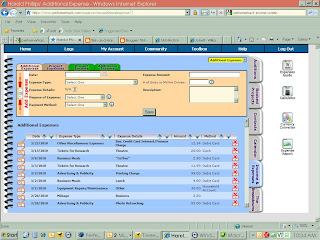
You'll note that four tabs appear on the top of the "Expenses" screen. If the receipt you're entering into PerformerTrack is related to a specific project (like, for instance, parking at an audition or dry cleaning a costume for a show), then you'll want to click the "Project Expenses" tab and choose the appropriate project from the yellow menu at the upper-right of the screen (that drop-down menu says "Additional Expenses" now, because that's the screen we're in!).
Fill out all the fields in the expense screen (whether "Project Expense" or "Additional Expense - the fields are the same). It's important to note that the "Expense Details" section changes, depending on the type of expense you're logging. So, for instance, if you're logging expenses for your Home Office - again, be sure you check with a tax professional about whether or not you qualify for the home office deduction- the "Expense Details" drop-down changes to list specific types of expenses associated with your home office (homeowners insurance, rent, alarm fees, etc.) The small red, white and blue icon next to that drop-down links you to PerformerTrack'sonline expense guide - a handy source of information on deductible expenses actors can track in the system.
See the little "blue cross" icons next to the "Purpose of Expense" and "Payment Method" drop-downs? Those icons indicate that you can create your own items on that list. This allows you to break down your expenses even further - you can track how much money you spent parking for auditions vs performances, for instance... or how much you spent on your credit card vs. your bank account.
Finally, be sure to note all the details about your expense in the "Description" box. This is a more expansive version of writing on your receipt - you can note the purpose of your expense, who you met with, what you discussed, or anything else that you think would help justify the expense should the IRS... uh... "ask" about it :).
Click "Save," and your expense is logged into the system. Seem like a lot of work? It's really not, once you get into the habit of entering your expenses ... and the payoff every April is well worth the time you spend. What pay-off am I talking about? Well, look at the far-right of the screen... do you see that white button labeled "Expense Report?" A little work every day/ week/ month entering your expenses into the system will pay off when tax time rolls around and all you have to do is click that button - producing a report of all your expenses for the year.
The income section works in much the same way - you enter the income you've made for each project into its own screen (you'll notice that there's also a section for "additional income"... I've never used this section, as all my income is related to some project I've worked on - but it's there).
There's a couple of things to note about PerformerTrack'sincome screen - See the spaces for "Gross Amount" and "Net Amount?" Recording these figures help you double-check to see how much withholding you've already paid on your W-2 income - and many agents base the commission you owe on your GROSS pay for a job, rather than the NET.
A large portion of union dues are based on a percentage of the union earnings an actor brings in every year. That's why PerformerTrack added the Union Affiliation drop-down. Many union performers have to scramble every year - again, the same way they do at tax time - to pull together pay stubs and memos, so they can figure out how much they owe their union in dues. When you enter your income into PerformerTrack, you can specify whether the income was SAG, AFTRA, Equity, etc... or whether it was non-union. If you've tracked this information in the Income screen, dues-time becomes a snap - all union performers have to do is run an income report, and their union earnings are displayed on one page. This saves a lot of time and effort!
Finally, take a look the PT and CT icons on the right side of the income screen. Remember my recommendation that you set up a bank account for your acting business? One of the many advantages to keeping a business account is the ability to hold a percentage of your income back to pay for your acting expenses. Like headshots - you know you need them. Saving a portion of your acting income in your business account will help you pay for them in a matter of months!
PerformerTrack calls this your "Performer Trust" account. This area of the expense screen prompts you to hold back a certain percentage of your acting income for these business expenses. Just choose "Yes" in this area, and the system will calculate an amount to hold back - from 2.5% to 20% of your pay check. You don't have to hold money back in your "Performer Trust" account... but if you ever want to get ahead and pay for some of those expenses, the cash has to come from somewhere! You'll note that there's a Performer Trust Report button on the right side of the screen... you can pull up a report at any time to see how much you've saved towards that new reel or pair of shoes.
The second icon, "CT" is a Child Trust tracker. Parents managing their children's performing careers are familiar with the Coogan Law - I'm not as familiar with it because, well... I don't have kids who are actors. My understanding, though, is that parents are required to withhold 15% of all their child actors earnings in a trust account. This area in the PerformerTrack income screen lets you track the amount deposited into that trust account. I'm obviously weak in this area... for more information take a look at this section of the official PerformerTrack site.
Again, all the details PerformerTrack's income system asks you to record may seem a little daunting... but when Tax-time comes around, being able to print a report detailing all your income can't be beat! No more sorting through W-2's and 1099's, adding up gross vs. net figures... once it's in the system, you can just run a report and transcribe it onto the appropriate tax form - or drop it off with your tax preparer. He/she'll be very grateful to you for making the job so much easier!
I'm sure that after all this, you can see the advantage of tracking your income and expenses in PerformerTrack - and now is the time to start! We're not too far into the year, so adding the income you've made and the expenses you've put out this year wouldn't be as long a process as it would be in, say, September! As I mentioned in the last post, HoldonLog has offered my readers a special discount: if you want to check the system out for yourself (and I'd highly recommend that you do), you can save 20% off a one-year subscription by entering the coupon code PORTLAND9 in the check-out screen.Now's the time to get started... before those receipts and pay stubs start to pile up again!
Next week we're going to take a step back from just tracking your income and expenses for taxes... we're going to talk about using your money to help build your business, rather than letting the money control your decisions. Until then...
We're going to finish up our discussion on taxes by looking at some tools to help you track your career activities throughout the year. A lot of the actors I work with in private Business Coaching sessions spend weeks every March and April trying to reconstruct their activities from the past year - pulling together receipts, going through old rehearsal schedules, and compiling list upon list to transcribe onto their tax forms. Tax season doesn't have to be so frustrating - a lot of sweat and effort can be a avoided if you'll just take a little time during the year to log your income, expenses, and career activities; that way when April rolls around you'll have all your information in one place so you can gather it together with ease, get your taxes filed... and getting back to doing the work you want to do: auditioning and performing!
>> You don't have to spend a lot of money on these tools. We've already talked about one cheap-and-easy-to-use option that makes tax time easier - an Accordion File can help you separate your receipts into deductible categories (be sure to note the purpose of your expenditure on the receipt... more on that in a minute). Other less expensive tools like these can help you keep track of expenses you don't get receipts for - like the miles you drive to conduct business (including trips to audition, perform, meet with producers and directors, check your mail, go to the bank...)
That mileage is a legitimate deduction (within certain boundries - be sure to consult a licensed tax preparer to get all the details.) The thing is, you have to keep track of it - and you have to produce a log to prove you drove those miles for legitimate business purposes if the IRS asks ("asks" is such nice term for an audit, don't you think?) At the very least, be sure to note the date of the trip, the miles driven, and the purpose of the journey. To be totally prepared to justify your mileage to the IRS in an audit, you should also list your car's odemeter reading at the beginning of the year, the beginning and the end of the each trip, and at the end of the year.
Sounds like a lot of information to record in a simple notebook, doesn't it? Maybe one of these is a better investment - for a little more money you can get a pre-printed booklet to fill out every year. Just keep it in your car's glove box, and pull it out every time you make a business-related trip!
>> Did you notice that word I used a couple paragraphs back - justify? I hope you never have to go through an audit, but if you do the IRS is going to expect you to justify the expenses you've written off on your taxes - prove to them that the money you spent was used to conduct or build your business. That's why we make notes on the receipts that we save every year - if anyone asks, we can tell them (for example) WHO we had coffee with and WHAT was discussed and HOW that meeting contributed to our performing business.
An actor's most important tool can also help to justifyhis or her expenses: the calendar. You probably already use a calendar to keep track of your auditions and appointments (at least I hope you do!) - whether it's small and pocket-sized, a larger "Day Runner" style, or an electronic PDA (I myself have opted for the "Smart Phone" option - my Blackberry Storm carries all my calendar and contact data in one compact package. It's very handy!) Noting every class, audition, performance, meeting, or appointment in your calendar - yes, EVERY one - will give you extra amunition in case you have to justify your expenses to the IRS.
Lets face it - the IRS knows that anyone can write a note on a receipt at any time, claiming that a lunch at Kornblatt's Deli was a business expense and not a personal one. Having that lunch documented in your calendar, though, and noting who you're meeting with and why is going to help support your receipt - and make it look a LOT more legitimate if the IRS "asks."
>> Of course, the point of all this was to make tax time easier, not harder... all this seems like a lot of work, doesn't it? Making notes on receipts, filing them, writing appointments in your calendar, noting your mileage... and that doesn't even begin take into account the work of pulling all that data together at tax time. Isn't there an easier way to get all your tax information together in one spot?
Of course there is... and regular readers of my blog have probably already figured out what I'm going to recommend:
HoldonLog'sPerformerTrack "webware" combines all the tools I've mentioned above - your calendar, your mileage log, your receipt file... and it makes tax-time a breeze by letting you print out reports in April (or whenever you feel like it) that breaks down your income and expenses. You still have to use the system - entering in appointments, income and expenses... but entering it in once gives allows you to access that data any time, and saves you the trouble of stacking paperwork and transcribing at tax time.
It also saves you the trouble of going through those bank statements I mentioned last week... entering in your income as it comes in produces a report of everything you've made in the past year. An extra bonus for union actors - income can be categorized by union, so at dues time you don't have to hunt for pay stubs to figure out how much you owe (we'll get into that a little later...).
Next week I'm going to take an in-depth look at PerfomerTrack, and show you how using the system can help make tracking your income and expenses a snap. If you don't want to wait, though, visit the http://www.performertrack.com/ and take a look for yourself! PerformerTrack is a subscription-based service (though it doesn't cost much - a yearly subscription works out to just $9.95 a month), but I can help you out there... Because I believe every actor can benefit from using their system, I've worked it out with HoldonLog to offer my readers a special deal. You can save 20% off a one-year subscription to the system by entering the coupon code Portland9 into the check-out screen. That drops the subscription price down to $7.96 per month... a lot of Portlanders spend that in two days at the coffee shop.
As always, feel free to email me your questions or comments... or send them to me on Twitter! For now...
...that doesn't mean I'm not watching today's SAG elections closely. Look, I'm a non-union actor, but what happens within the guild (and within AFTRA, the television and radio union) affects me - and more importantly my local market - a great deal.
Hey, it's no big secret. My business is changing; we saw more than a few nods to that fact at Sunday's Emmy Awards when half the jokes were about the "death of traditional television" and the rise of "new media." The amount of work I've been doing over the past couple of years is directly related to the way the industry is changing - inexpensive equipment and editing formats, digital self-distribution, "web-tv," and increased state incentives have all conspired to make this a golden age of opportunity for actors around the country. Now more than ever, you don't have to live in New York or Los Angeles to have a career in the entertainment industry.
As I said before, I'm a non-union actor... but that doesn't mean I'm anti-union. The reality of the Portland market is that, currently, there's more non-union work available than union work. Union actors are barred from working non-union jobs, and that's posed a real catch-22 for SAG and AFTRA members here in town - most union actors weren't able to work more than a couple of jobs a year, unless they wanted to work "off the card," withdraw from the union(s), or go "financial core" - any of which would serve to weaken the purpose of the union, which is to provide uniform protection and collective bargaining for the acting profession.
Looking at that catch-22, I've opted to stay non-union... for the time being. Recently, things have been shifting in the Portland market. Big out-of-town productions such as Leverage,Twilight, and Untraceablehave been shooting here regularly. More importantly, support for the actors unions has been growing within our local industry; I've talked to at least four filmmakers in the past year about projects they're planning to mount in coming months - all of them plan to be SAG or AFTRA signatories. The official announcement has been made that Electric Entertainment
is going to bring Leverage back to Portland third season... and then there's that Daniel Baldwin guy...
Besides, I may have to join the union(s) before too long... generally speaking, you can only work one union job as a non-union actor (under the Taft-Hartley law). In order to work on another union shoot, you must join the appropriate union. I and other actors here in Portland are thinking that our non-union days may be numbered... which, given the circumstances I outlined above, isn't as scary a prospect as it might have once been.
What keeps it from being so scary is the increase in union work in my region... and that's why I'm watching this SAG election so carefully (you didn't think I'd ever get back to the point, did you?). For those of you not following SAG politics, the two major candidates for president this year are Anne Marie Johnson (representing the "Membership First" faction) and Ken Howard (representing the "Unite For Strength" faction). I'm not going to go into the differences between the candidates and the factions... click the links if you want to find out more about them.
What's got me watching so closely is Johnson's recent statements of support for the SAG "Branches" (Portland constitutes one of these), and the Regional Branch Directors responses to these statements. Now, generally speaking, the respondents to Johnson's statements have been in support of Howard, and I haven't seen a similar breakdown of Howard's attitudes and opinions on the branches... but that last article from SAGwatch gives me pause, and makes me wonder just how much support SAG Portland is going to get from a Johnson presidency.
I'm not a SAG member, but that doesn't mean I won't become one. Whether I, and other non-union actors in the branches actively seek membership in the unions depends largely on the amount of work we can expect in our areas... and that's going to depend on how much support the branches get from the national union. Look, guys, production is not going to stop leaving Los Angeles for other areas of the country; as I mentioned above, technology and incentive programs have made sure that you don't have to be based in LA to get films and TV shows made. It seems to me that it would be in the union(s) best interest to strengthen their presence in these outlying areas, to preserve the overall amount of union work. But hey, what do I know... I'm just a non-union actor in a Branch, not a "real" actor in LA, right?
I hope that SAG voters think about the future, and the way the industry is changing when they cast their votes. I guess we'll find out when the results are announced tomorrow...